The dashboard
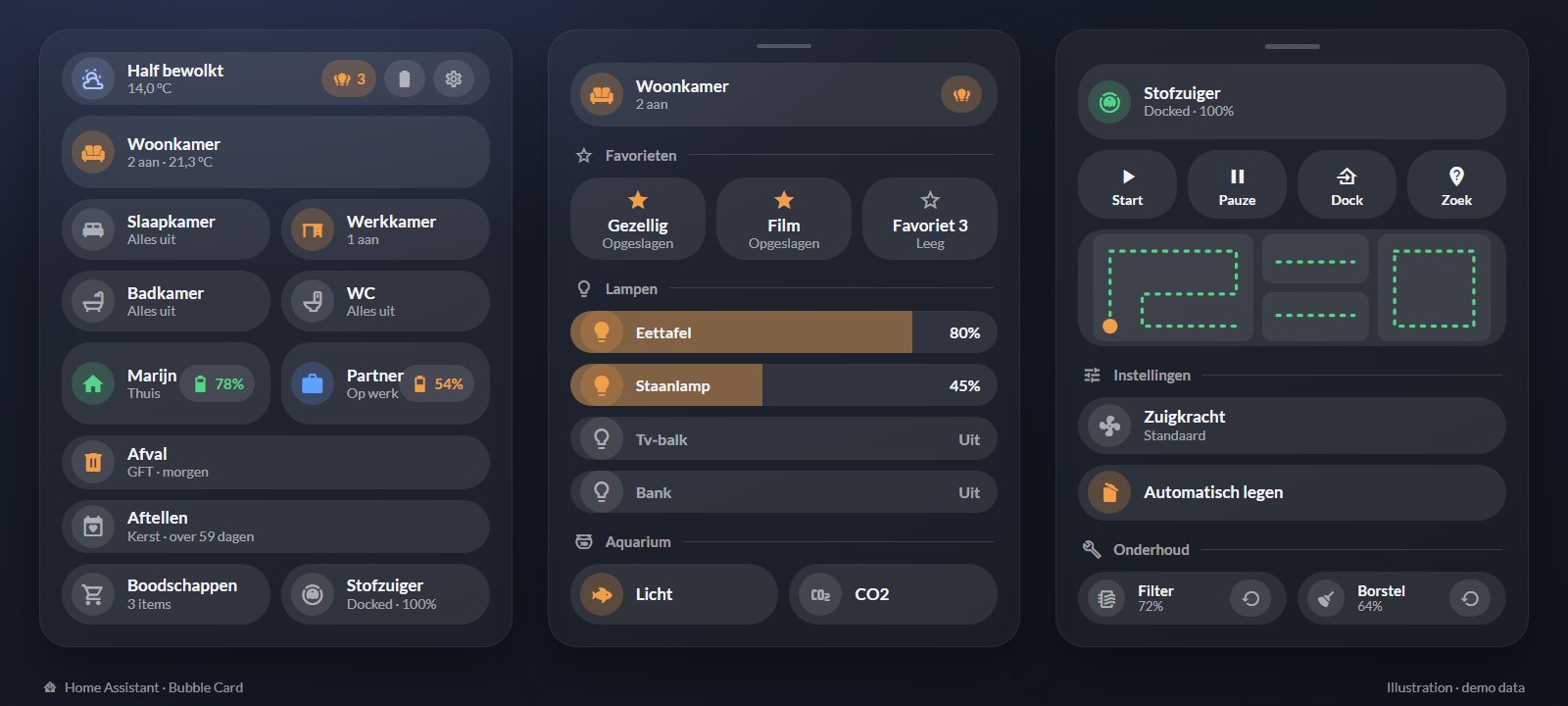
Why I built it
My previous Home Assistant setup was built while I still lived with my parents. It belonged to that house, so my own home needed a new Home Assistant anyway. I chose to start fresh and do it properly from the beginning, with consistent names for devices and rooms.
The result is a cleaner, more streamlined dashboard than the old one, and I'm very happy with it.
What it does
Lights per room
Five rooms, each with its own pop-up. Every lamp has brightness, colour-temperature and colour sliders, plus warm, neutral and cool presets and six colours.
Saved favourites
The living room and the bedroom each have three favourite slots. Hold one to save the room's current lights, tap it to bring them back. The names are editable.
Status at a glance
The top card shows the weather and temperature, how many lamps are on, and turns red when a battery drops below 20 %. Room group lights are left out of the count, so only real lamps are counted.
Presence
For each person: home, at work, at an internship, in the car, on the bike or walking, worked out from the zone and the phone's activity sensor. Pop-ups show the phone battery and can make a phone ring loudly or ask for a fresh location. The battery percentage can hint at why the other person isn't responding.
Household
Waste-collection calendar with a countdown per type (GFT, paper, PMD, general waste), birthday and Christmas countdowns, and a shared shopping list.
Robot vacuum
Start, pause, dock and find controls, suction level, automatic emptying, a live map, and wear counters for the filter, brushes and sensors, each with a reset button.
Around the house
Air purifier with a PM2.5 reading, aquarium light and CO₂, 24-hour temperature and humidity graphs, and a media player.
Admin mode
Admin tools such as Zigbee pairing and the location map are only visible to my own user. Home Assistant's sidebar and header are hidden (kiosk mode) unless admin mode is on.
Automations
Everyone away
A switch in the settings pop-up turns this automation on or off. When my partner and I are both away from home, it turns off every light that is still on and starts the robot vacuum. With visitors, or when someone is still at home, we simply switch it off.
Waste reminder
The day before a collection we get a notification that says which waste has to go to the curb. It has an “At the curb” button: once one of us taps it, there is no reminder at the end of the day and the notification disappears from the other phone.
How it's built
- Hardware: Home Assistant OS running on a Dell OptiPlex.
- Bubble Card for the interface, with card-mod for styling and auto-entities for the lists that build themselves (batteries, waste types). These are extensions that run inside Home Assistant.
- Jinja templates drive most labels, icons and colours: the weather becomes Dutch text and a day or night icon, presence icons change colour per state, and the countdown finds the next birthday or Christmas.
- Pop-ups instead of pages. Every room, lamp and function opens as a pop-up through a URL hash (for example
#woonkamer), so the main view stays a single column. - Data from several sources: Zigbee2MQTT for the Zigbee lamps and sensors, the Home Assistant companion app for phone location, battery and activity, a waste-collection integration, the vacuum's own integration and a weather integration.
- Confirmation on big actions: switching every light off, saving a favourite, resetting a wear counter and making a phone ring all ask first.
- Access control: the admin section only appears for my own Home Assistant user.
Who built what
Part of the configuration I wrote myself, part I built together with an AI assistant (Claude), and some parts I found online. The interface extensions (Bubble Card, card-mod and auto-entities) are community projects by other developers.
Tools
Want to know more about this project?
I'm happy to walk you through how it's set up.